
To help you stay ahead of the curve, here is a curated list of the most effective AI tools that offer free tiers or generous credits. These are organized by your specific needs: video, images, and office productivity.
For high-quality video production without a professional studio, these tools are currently leading the market:
One of the most powerful models for generating cinematic, high-fidelity video clips from text prompts. It offers a set amount of free monthly credits for users.
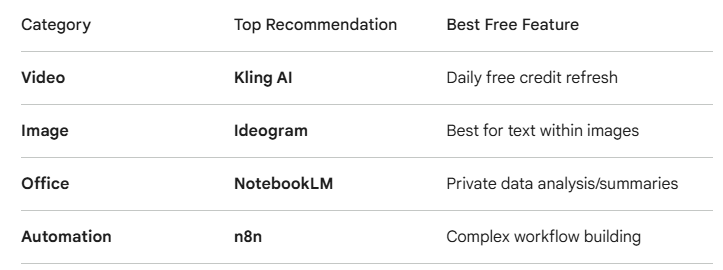
Known for its realistic physics and smooth motion. It provides approximately 66 free credits daily, which is excellent for consistent content creators.
Great for adding creative animations to static images or generating short, stylized clips. It offers a "recharge" system for free credits.
If you have long-form videos (like meetings or webinars) and need short clips for social media, this tool automatically identifies "viral" moments and crops them for you.
These tools allow you to create professional visuals, thumbnails, and branding assets:
Completely free to use with high-speed generation. It is currently one of the few tools that doesn't have a strict daily limit for basic users.
Powered by DALL-E 3, this is perfect for high-quality, descriptive images and integrates directly into the Windows ecosystem.
The "gold standard" for images that require accurate text (like logos, posters, or thumbnails). It offers a limited number of free daily generations.
Excellent for consistent styles and high-end artistic control. You get 150 credits that reset every 24 hours.
To streamline your daily tasks, from email management to documentation:
A free AI meeting assistant that records, transcribes, and highlights key action items from Zoom, Teams, or Google Meet.
Upload your own PDFs, docs, or notes, and it creates a "mini-brain" you can chat with to summarize complex information or draft reports based only on your data.
A voice-to-text tool that understands context. It’s significantly faster than typing for drafting emails, Slack messages, or project updates.
A powerful "low-code" automation tool (an alternative to Zapier) that helps you connect different apps. It’s excellent for moving data between systems without manual entry.project updates.
Best for presentations. You provide a prompt or a document, and it builds a full, professionally designed slide deck in seconds.
Quick Comparison Table






Recent Comments